0. The Basics You Need To Know Before Getting Started With Spring Boot
Before jumping into Spring Boot, let us go through some of the basics that you need to know.
Imagine we're building a Student Management Application that allows users to:
- View all students.
- Find a student by ID.
- Add a new student.
- Update student details.
- Delete a student.
Let us understand the below concepts first:
- How does a web application work?
Suppose a user wants to retrieve all students. They open their browser and navigate to: http://localhost:8080/students. What happens next? The browser sends a request to our backend application, which processes the request and returns the students information.
This interaction has 3 entities: client, server and HTTP.
Client: A client is an application or device that requests information or services from another system. Examples include: A web browser like Chrome, Postman, which developers use to test APIs or another backend application communicating with our service.
Server: An application that listens for requests, processes that request and runs some business logic and responds to them. Some popular web servers include Apache HTTP Server, Nginx, and Apache Tomcat.
HTTP: HTTP stands for Hypertext Transfer Protocol. It is an application-layer protocol that defines how clients and servers exchange requests and responses.
For example, when a browser requests student information, it might send:
GET /students HTTP/1.1
Host: localhost:8080
Let's break this down.
GETis the HTTP method, indicating that the client wants to retrieve information./studentsis the requested resource path.HTTP/1.1specifies the HTTP protocol version.Hostidentifies the target host and port.
Other common HTTP methods include:
| HTTP Method | Common purpose |
|---|---|
| GET | Retrieve information |
| POST | Create a resource or submit data |
| PUT | Replace or update a resource |
| PATCH | Partially update a resource |
| DELETE | Delete a resource |
The server processes the request and might return the data as shown below if successful:
HTTP/1.1 200 OK
Content-Type: application/json

[
  {
    "id": 1,
    "name": "Alice"
  },
  {
    "id": 2,
    "name": "Bob"
  }
]
Here:
200 OKindicates that the request succeeded.Content-Type: application/jsonindicates that the response body contains JSON.- The response body contains the requested student data.
JSON stands for JavaScript Object Notation. It is a lightweight data format commonly used by REST APIs.
- What is a REST API?
An API, or Application Programming Interface, defines how software components interact. A REST API exposes resources through URLs and uses HTTP methods to perform operations on those resources.
For our Student Management Application, we might define:
| Endpoint | Method | Purpose |
|---|---|---|
/students |
GET | Retrieve all students |
/students/1 |
GET | Retrieve student with ID 1 |
/students |
POST | Create a student |
/students/1 |
PUT | Update student with ID 1 |
/students/1 |
DELETE | Delete student with ID 1 |
- What are Java Servlets and Servlet Containers?
Suppose a browser requests a static HTML page. A web server can read the file and return its contents without executing application-specific business logic.
But what happens when a user requests: GET /students/1. The response depends on application data.
The backend may need to:
- Extract the student ID from the request.
- Execute application logic.
- Query a database.
- Construct a response.
- Return the result as JSON.
This is dynamic request processing.
In Java web development, a common way to handle dynamic HTTP requests is through the Servlet API.
A Servlet is a Java component that runs inside a servlet container and handles requests, commonly HTTP requests. A servlet can read request information, execute Java code, and produce a response.
For example, a simplified servlet might look like this:
import jakarta.servlet.http.HttpServlet;
import jakarta.servlet.http.HttpServletRequest;
import jakarta.servlet.http.HttpServletResponse;

import java.io.IOException;

public class StudentServlet extends HttpServlet {

    @Override
    protected void doGet(
            HttpServletRequest request,
            HttpServletResponse response
    ) throws IOException {

        response.setContentType("text/plain");

        response.getWriter()
                .write("List of students");
    }
}
Here:
HttpServletprovides HTTP-specific servlet functionality.doGet()handles HTTP GET requests routed to this servlet.HttpServletRequestprovides information about the incoming request.HttpServletResponseallows us to construct the response.
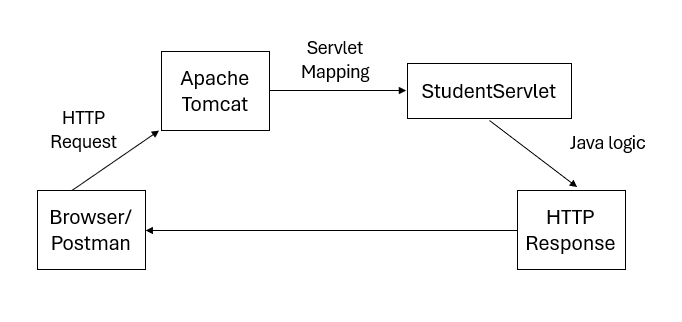
This example focuses only on the servlet logic. The servlet must also be registered and mapped to a URL before it can receive requests. Does Java automatically create and manage these servlet objects? No. A servlet container handles that responsibility.
A servlet container is a runtime environment that manages Java Servlets.
Its responsibilities include:
- Creating and initializing servlet instances.
- Managing servlet lifecycles.
- Mapping incoming requests to the appropriate servlets.
- Providing request and response objects.
- Managing servlet-related infrastructure such as sessions and filters.
Without a servlet container, an ordinary Java servlet does not automatically become an HTTP endpoint. A common servlet container is Apache Tomcat.
A simplified flow looks like this:
- Then why not build everything using Servlets?
We can build Java web applications directly using Servlets. However, as an application grows, manually handling request routing, parameter conversion, validation, object creation, dependencies, and error handling becomes repetitive. Imagine an application with hundreds of endpoints. Writing and maintaining all the infrastructure manually would become cumbersome. Developers need abstractions that simplify these common tasks. This is one reason frameworks such as Spring are useful.
What is the Spring framework?
The Spring Framework is an open-source framework that provides infrastructure for building Java applications. It is widely used for backend and enterprise application development. Spring helps developers manage common application concerns so they can focus on implementing business logic.
Some of its important capabilities include:
- Inversion of Control (IoC) and Dependency Injection (will be covered in the articles later)
- Data access: Working with databases and managing transactions.
- Web development: Building web applications and REST APIs.
- Application events: Communicating between application components.
- Validation: Validating application data.
- Testing: Integrating application components with testing frameworks.
- Integration: Working with messaging systems and external services.
What is Spring MVC?
Spring MVC is a web framework within the Spring Framework. MVC stands for Model - View - Controller, a design pattern that separates an application's responsibilities. Let's understand each component.
Model: The Model represents application data and the information needed to produce a response or render a view. For our Student Management Application, the model might contain student information.
For example:
public class Student {

    private Long id;
    private String name;

    // Constructors, getters, and setters
}
A model is not necessarily a database entity. It may represent data used by a view or application response.
View: The View is responsible for presenting information to the user.
In traditional server-rendered web applications, the view might be an HTML page generated using technologies such as Thymeleaf or JSP.
For example, a view could display:
Student Management

ID    Name
1     Alice
2     Bob
In REST APIs, the server typically returns data such as JSON rather than rendering an HTML page.
Controller: The Controller receives application requests and coordinates the appropriate response. In Spring MVC, controllers are commonly defined using annotations.
For example:
@RestController
@RequestMapping("/students")
public class StudentController {

    @GetMapping
    public String getStudents() {
        return "List of students";
    }
}
Let's understand the annotations.
@RestController: Marks the class as a REST-style controller.
@RequestMapping("/students"): Defines the base request path handled by the controller.
@GetMapping: Maps HTTP GET requests to the annotated method. In this example, a GET request to /students invokes getStudents(). The returned string is written to the HTTP response body.
We will look at annotations in detail in other articles.
But when Tomcat receives an HTTP request, how does Spring MVC know which controller method should handle it?
This is where the DispatcherServlet comes in.
What is DispatcherServlet?
The DispatcherServlet is the central front controller of Spring MVC. It receives requests routed to it by the servlet container and coordinates their processing using Spring MVC components. It doesn't execute all the application's business logic itself. Instead, it determines which component should process a request and coordinates the surrounding framework behavior.
Suppose the client sends:
GET /students HTTP/1.1
Host: localhost:8080
Let us follow the request:
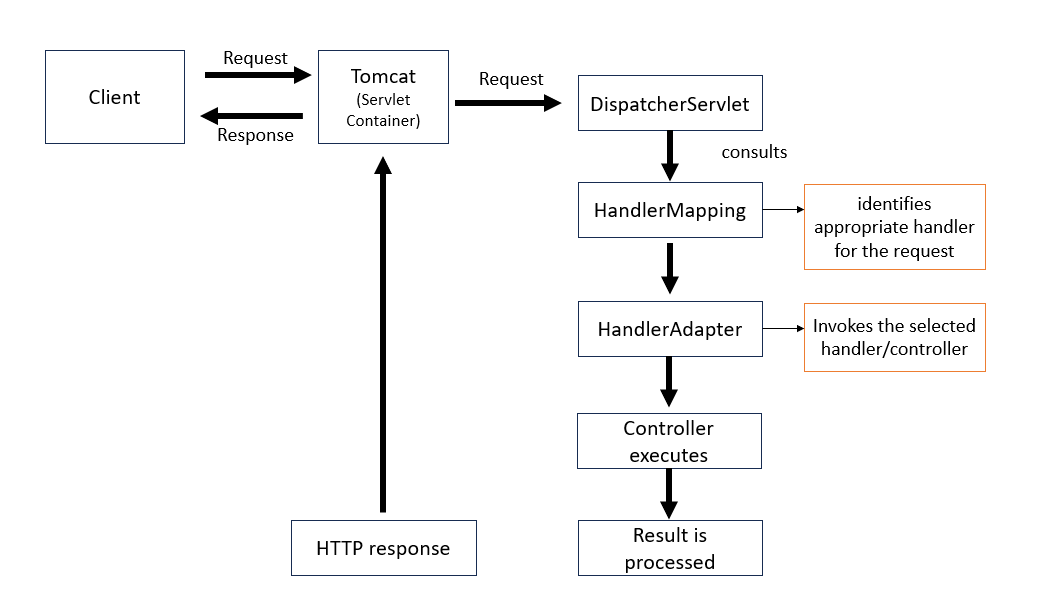
Note: The servlet container uses its servlet mappings to determine which servlet should handle the request. For a typical Spring MVC application, requests are routed to the DispatcherServlet.
Let us now understand how traditional spring web applications were configured and deployed and then let us get started with spring boot.
About the author
- Software Engineer who enjoys building things. Always open for opportunities to build impactful products with great engineering teams.
Comments
Join the discussionNo comments yet. Be the first to comment.
Spring Boot
A comprehensive, beginner-friendly guide to Spring Boot, from fundamentals to advanced backend development.